Monday, September 16, 2013

DIY Smartwatch: Screen Hunting

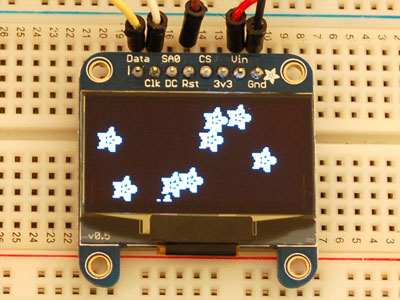
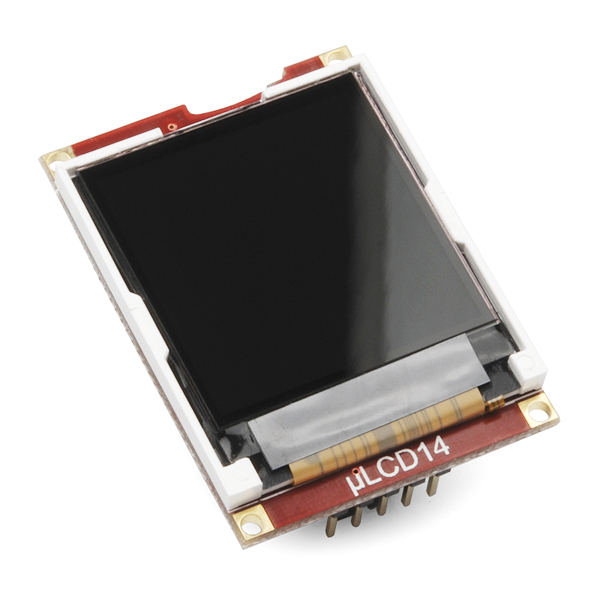
First thing's first, the main component of the watch is going to be the screen.  Almost all functionality and features (interaction, battery life, display, notification style, etc.) will be dependent on what the screen is and how it works.  The main hobby stores I follow are Adafruit and SparkFun so below I've listed X different screens that I found and would be suitable given my constraints.  I also find a good portion of my electronics on eBay but most of the displays I found there were just cheap knock-offs of the Adafruit and SparkFun designs and I'd much rather get the main component of my project from a reputable source with lots of example code instead of a questionable one.  The displays I found also came with breakout boards which added 5-10mm to both dimensions so ultimately I think I'll be using the screen dimensions as the final dimensions for the finished product.

Primary Criteria:

  • 45x45mm
  • Low Power - less than 50mA
  • Greater than 1.25" diagonal
  • Easy to interface
Secondary Criteria:

  • Color
  • Touchscreen
  • $40 or less


Adafruit:


  • SHARP Memory Display Breakout - 1.3" 96x96 Silver Monochrome
    • Dimensions - 40x40mm
    • Power Consumption - Nothing specific listed on the site, but after going through Sharp's spec sheets it looks like power consumption stays under 5mA for constant updating and drops down to under 10uA for a static image.
    • Interface - SPI with easy to use library
    • Price - $40
SparkFun:

  • Serial Miniature OLED Module - 1.5"
    • Dimensions - 45.5x33.5mm
    • Power Consumption - 40mA average
    • Interface - Serial
    • Price - $50
    • Bonus - SD card holder, onboard graphics processor
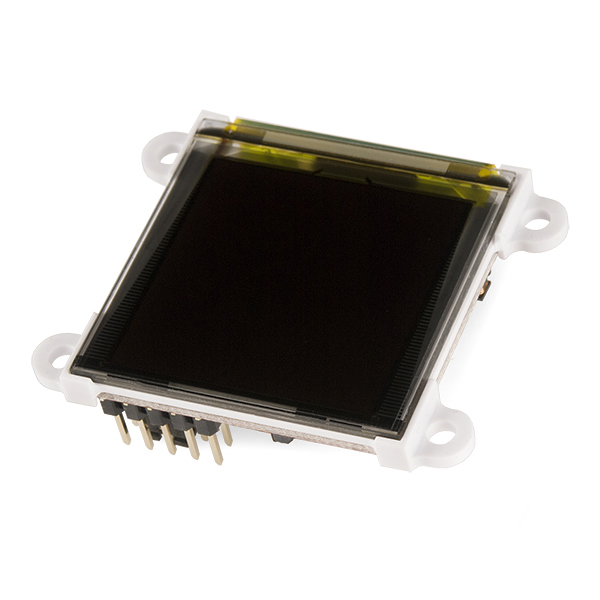
So I'm going to rule out the SparkFun modules right off the bat.  While the idea of getting a large screen with a built in microcontroller is appealing, I'm already going to be spending a lot of time figuring out how to program the watch and making the Android app so I'd rather just use an AVR chip since I'm familiar with them.  In addition, these modules are roughly $10 more than their dumb counterparts, whereas an AVR chip only costs a few dollars.  The Nokia module is also surplus and rather old so it might arrive in questionable condition and I'd rather future proof this watch as much as possible by making the most expensive component of the watch robust, futuristic, and nice to look at.

This leaves me with the monochrome OLED, SHARP memory display, and color OLED.  Since the monochrome and color OLEDs both have similar power consumption, I'm going to rule out the monochrome one in favor of the using the full range of color.  So ultimately the decision comes down to two very nice displays at $40 each, with both displays having their benefits and drawbacks.

On the one hand, the SHARP display has negligible power consumption which is a big concern, but it has slower update rates, is monochrome, and is a write only display, meaning the entire image must be stored in memory, taking up valuable program space.  The color OLED display has a respectable range of color, a higher resolution, a faster update rate, but consumes far more power.

Ultimately, I'm in favor of the color OLED display.  Making this watch will be a long term project, with many upgrades and tweaking along the way, so I'd like to get the nicer display now, deal with the lesser battery life in the short term, and upgrade to a nicer battery later or just carry around a spare.  It will also act as incentive to optimize power consumption and create some power saving algorithms that could apply to future projects.

Sunday, September 15, 2013

DIY Smartwatch: Project Definitions

Now that I've reviewed what the current smartwatch offerings are, it's time to define a set goals for my own version.

Primary Goals:

  • Size (<= 45x45x10mm) - Regular watch sizes vary from 34mm to 40mm with larger ones reaching up to 44mm.  The smartwatches on the market tend toward the larger end of the spectrum so I'm going to set a hard limit at 45mm x 45mm size, with a push for smaller.  Thickness is another matter entirely.  Most hobbyist screens on the market need a breakout board which means my watch will need to have two PCBs and a battery sandwiched together.  The commercial offerings average at a thickness of 10mm so I'm going to shoot for around there.
  • Connectivity (BLE) - This is a simple one.  My phone supports BLE and battery life is going to be a huge issue so I'm going to try cutting power consumption wherever I can.  BLE is the obvious choice and there are a couple of cheap modules available on eBay.
  • Screen ( > 1.25") - This choice will be largely dependent on my power budget and how power hungry the options for screens are.  However, since no screen on any of the watches currently offered is less than 1.25" diagonally, I think that's a good minimum goal to shoot for.  In terms of screen technology I assume I'm going to have to use some sort of OLED or low power LCD since the eInk type displays offered on the hobbyist market are still pretty sparse.  Maybe I'll get lucky, but I would definitely like to have a color screen if at all possible.
  • Battery Life (8 hours) - Since I'm attempting to make a nice smartwatch that has similar functionality to commercial offering, I'm obviously going to have to make sacrifices somewhere.  It's probably going to end up being in the battery life category.  I can't afford low power components and don't have the means to solder tiny chips onto a PCB.  I also don't have much choice when it comes to hobby batteries' sizes and shapes so I will be using the best possible options.  All these factors combined means I'm going to set a goal for an 8 hour battery life so it can last through a whole work day.  Worst case scenario, I can get multiple batteries and swap them out when necessary.
  • Price (<= $100) - As stated in my previous post, early supporters of the Pebble smartwatch could get one for $100 and that seems like a reasonable amount, so I'll set a hard limit at that price, though hopefully it will end up being cheaper.
  • Interactivity - This one is pretty much up in the air.  I'm experienced enough in Android programming that I can do a lot of the settings and notification handling on the phone side of things, but I would like to add some functionality to the watch as well.  If I get lucky I'd like to use a touchscreen but I'm not sure how likely it is to find one in the right size so I'll probably end up with a few tactile switches for selection and most of the controls.  I'd also like notifications to trigger something more noticeable than the screen lighting up so I'd like to add a vibration motor or a status LED as well.  Additionally, I think an accelerometer would be a useful sensor to add since it probably uses negligible power and could be used for gesture recognition and other interfacing ideas.

Monday, September 9, 2013

DIY Smartwatch: Current Offerings

Time for the most important step of the design process: the product definition.  I'm going to take some time, research some examples, and write down specifically what I (would) want in a custom smartwatch.  Let me start off by outlining the features of some current smartwatches on the market and using them to zero in on what I want.

Battery life:
  • Pebble - Roughly 7 days, mostly due to the ePaper display
  • Galaxy Gear - Roughly one day
  • Qualcomm Toq - 3 to 4 days
  • Sony SmartWatch 2 - 3 to 4 days
Screen:
  • Pebble -
    • Sharp Memory or ePaper which means no color, just black and white, but has a backlight
    • 1.26"
    • 144x168 pixels
  • Galaxy Gear - 
    • Super AMOLED display which means lots of bright vibrant colors and no power draining backlight
    • 1.63"
    • 320x320 pixels
  • Qualcomm Toq - 
    • Mirasol Color Display, similar to eInk but with color, pretty low power usage
    • 1.55"
    • 288x192 pixels
  • Sony SmartWatch 2 -
    • Transflexive LCD which I assume means some sort of low power LCD screen
    • 1.6"
    • 220x176 pixels
Size:
  • Pebble - 32mm (W) x 50.33mm (H) x 8.44mm (D)
  • Galaxy Gear - 36.8mm (W) x 56.6mm (H) x 11.1mm (D)
  • Qualcomm Toq - 47.6mm (W) x  43.3mm (H) x 9.96mm (D)
  • Sony SmartWatch 2 - 42mm (W) x  41mm (H) x 9mm (D)

Connectivity:
  • Pebble - Bluetooth 2.1 or 4.0 (BLE)
  • Galaxy Gear - Bluetooth 4.0 (BLE)
  • Qualcomm Toq - Bluetooth 4.0
  • Sony SmartWatch 2 - Bluetooth 3.0, NFC
Interactivity:
  • Pebble - 4 navigation buttons, accelerometer for dismissing notifications with a shake, magnetometer, ambient light sensor
  • Galaxy Gear - Camera, 2 microphones, speaker, accelerometer, gyroscope, interactions with S Voice and other Galaxy features, touchscreen
  • Qualcomm Toq - touchscreen
  • Sony SmartWatch 2 - touchscreen
Price:
  • Pebble - $150
  • Galaxy Gear - $300
  • Qualcomm Toq - $300
  • Sony SmartWatch 2 - $180
So as a whole, the smartwatches on the market now have a lot to offer.  I probably won't be able to achieve the same resolution as any of the commercial offerings, but I think I can at least get some of the same features.  Size might also end up being an issue.  I'll most likely need to find a balance between features and size constraints.  Price is also worth mentioning.  $150 for the cheapest smartwatch is pretty steep.  The early backer price for the Pebble on Kickstarter was $100 so I'm going to try and shoot for less than that price range.

Sunday, September 8, 2013

DIY Smartwatch: Why do I care?

With Google Glass popularity on the upswing, Sony releasing its second generation of SmartWatch, and the recent releases of the Samsung Galaxy Gear and Qualcomm Toq, it's a great time for the wearable technology industry.  Since the advent of mobile phones, technology has become less a tool and more an extension of our selves.  While thirty years ago a computer was merely a high functioning calculator designed to accomplish work more easily, computers are now a ubiquitous tool that we carry in our pockets, carrying out tasks ranging from the mundane to critical.  As computers becomes more integral to our daily lives, technology companies will be focusing more and more on ease of use and availability of new technology.  The architectures of the notification systems in Android, iOS, and Windows phones are structured around streamlining the process of updates in one's personal life by making notifications noticeable and informative, yet subtle and accessed with the minimal amount of effort possible.

Smartwatches and Google Glass are what technology companies are hoping is the next step in making this process even easier for the consumer.  Why should a person need to go through the hassle of taking a phone out of their pocket, turning on the screen, and sifting through notifications when the same notification system can be grafted onto a device that is already always available.  Furthermore, with battery life in cell phones making minimal improvements over the past few years, it is even more important to remove the number one cause of battery drain, powering the screen.  Watches and Google Glass are meant to serve as a platform that consumers can use to keep in touch with their notifications and online presence without needing to separate themselves from their surroundings by taking the time to look down at their phones.  A watch is made for the occasional glance, used to inform oneself of the current time.  A smartwatch can be the same, with updates reflected directly on the screen so the user can quickly see if they need to respond to a notification.

Now personally, I don't believe smartwatches are all that cool.  Sure, it's another nifty little gadget, but it doesn't really add anything.  I don't really find taking my phone out of my pocket to be that big of a hassle.  However, I do think smartwatches are the first big technology that can be replicated by the Maker community.  In fact one of the first popular smartwatches, the Pebble, was created as a Kickstarter project.  I think it would be pretty fun and education to try and make a serviceable smartwatch so, time allowing, I might add it as another project on my list of things to do with blog posts documenting my process.

Saturday, August 17, 2013

Into the Sky: Hours 1-2

So in the first two hours of my project, I've programmed some basic GUI code.  I'm using Java and Swing for the front end since I have a good deal of experience with it.  The way I see it, an RPG needs a few core features in the GUI: A way to display stats, inventory, skills, etc., a console for displaying messages and chats, and a main screen to display whatever is happening in the RPG world.  I decided that I would use a sidebar on the left side of the screen with tabs for Stats, Skills, and Inventory with a Text Area at the bottom for displaying item/skill/stat descriptions.  Then the main screen would be on the right side above the chat/console window.  Everything is thrown together using JSplitPanes so that the user can customize the sizing of all the elements based on how the like it.  I started with the main code and adjusted down to the subcomponents since I prefer a top down approach.  The final product is in the picture below and all of the code is available at my github at https://github.com/kelliott121/IntoTheSky.

You'll notice the sidebar has separate tabs for each category, making it pretty easily expandable.  At some point I will probably add a settings or some such.  I've also included some example items for each tab.  The bottom console has a text area for displaying console messages and a text input area for chatting.  Lastly there's the screen, where I've implemented a small example for how it will be set up.  I'm using the JPanel class with a GridBagLayout and making a 2D array of JLabels with ImageIcons for the background images.  Since I'm shooting for a D&D style grid based game, I figured this would make it the easiest to implement.

Thursday, August 15, 2013

Game Design Project

One of the main types of coding projects I periodically come back to is game design, with my preference being RPGs.  As a kid, I played a handful of MMORPGs and some D&D, and at one point aspired to be a writer.  Since then I've ended up quite a ways from publishing my own novels, but I still enjoy thinking up entertaining fantasy and scifi scenarios as a creative outlet.  One bonus of being able to program is that I actually have the capability to implement some of these scenarios in the form of a game (assuming the art doesn't need to be above a 3rd grade level).

So I've fiddled around with a few RPG programming projects in the past couple of years, with none of them really going anywhere.  Just the other day, I started another one I've been conceptualizing for a couple of months.  Last spring my roommates and I started doing weekly D&D sessions, but after graduation it's been pretty much impossible for us to set aside time to learn the online D&D tools in addition to the hours it could take for a single gaming session.  Parallel to that, I also pondered about a science fiction game focusing on early space travel for humanity.  I personally enjoy science fiction shows and books about humanity's crawl from where we are now to an interstellar society.  I find near future, or at least futures heavily rooted in the present, settings to be the most compelling.  So I thought about different ideas for how we could reach the technology of interstellar travel and how that would relate to an RPG.

Since I will most likely never get to the point where I can design a high end 3D game, I've decided to shoot lower and attempt to combine the story I was creating with the game mechanics of Dungeons and Dragons.  This way I can hopefully one day soon continue my gaming sessions with my roommates in addition to providing myself a creative outlet.  With work, however, I can usually only average one or two productive hours a day, so I'm going to try and break down my design process on this blog hour by hour.  This way I'll be able to have an in depth view of how my game develops and hopefully some input from readers.

Wednesday, August 14, 2013

Life Update

It's been a while since my last post, and quite a bit has happened in my life.  I've graduated University of Delaware with my Bachelor's and have two classes left until I finish my Master's Degree, which I hope to do this Winter.  I will be taking this classes remotely from my new home in Pittsburgh, where I'm also working full time at Aerotech Inc, a motion control solutions company.  I've been there for about a month now, and it's been very interesting so far.  I've learned quite a bit about how larger companies operate as well as some professional programming styles.  I'll most likely be working very closely with DSPs and FPGAs, and I look forward to learning a lot about them!